 Homeling
Guide
What to wear for today's weather
Show Homeling your clothes once, and it picks an outfit for the weather and your day.
Three steps
- Add your clothes. Open Closet in the sidebar (⌘2), then click Add Photos or drag photos of your clothes onto it. Homeling looks at each photo on your Mac and notes what it is: the kind of clothing, its colours and pattern, how dressy it is and the season. The first photo can take a minute; the rest are quicker.
- Turn on the weather. In Settings → Outfits, turn on “Use the weather for outfit picks”. Then type your city and click Look up, or turn on “Use my Mac's approximate location”.
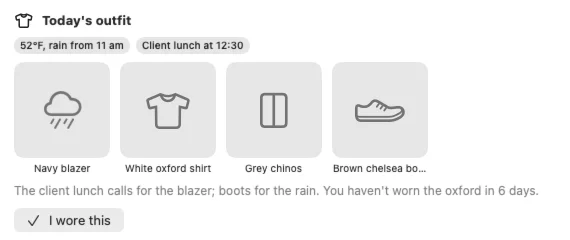
- Ask. Click “What should I wear?” in a new chat, or just ask. Homeling checks the forecast and your calendar, picks from your closet and tells you why. Today's pick also shows at the top of your Closet and in your morning report.

Good to know
- Wrong tag? Tell Homeling in chat, like “the blazer is navy, not black”. If it couldn't make out a photo, the item says Needs review until you tell it what it is.
- Wore it? Click “I wore this” in Closet, so Homeling remembers what you've worn.
- Your plans count. If you've let Homeling read your calendar, it takes a client lunch or a hike into account.
- No sales pitch. If an outfit would work better with something you don't have, Homeling may mention it, but it won't go shopping for it unless you ask. How Homeling recommends things explains why.
- Homeling uses its photo model to look at your clothes. It downloads it while setting up when you let it work overnight.